git示例2

参考: Git 原理入门 - 阮一峰的网络日志 (ruanyifeng.com)

示例六:版本控制

继续在alice分支中开发

1
2
3
4
5
6
7
8
9
# 向./aliceInfo/workList.txt中写入内容
PS ~\aliceWorkspace> echo "init repo" > .\aliceInfo\workList.txt
PS ~\aliceWorkspace> " status:complete" >> .\aliceInfo\workList.txt
# 添加并提交commit
PS ~\aliceWorkspace> git add .
PS ~\aliceWorkspace> git commit -m "first edit to aliceInfo/workList.txt"
[alice a8dd21a] first edit to aliceInfo/workList.txt
1 file changed, 0 insertions(+), 0 deletions(-)
create mode 100644 aliceInfo/workList.txt

1.撤销 工作区文件 的改动

如果某文件之前通过git add提交至暂存区,可以用restore命令将其恢复至暂存区中的状态

1
2
3
4
5
6
7
8
9
10
11
12
# 检查文件原本状态
PS ~\aliceWorkspace> cat .\task.doc
record everyone's name
# 修改目标文件
PS ~\aliceWorkspace> "duhgfaoshdohods" >> .\task.doc
PS ~\aliceWorkspace> cat .\task.doc
record everyone's name
duhgfaoshdohods
# 撤销改动
PS ~\aliceWorkspace> git restore .\task.doc
PS ~\aliceWorkspace> cat .\task.doc
record everyone's name

2.撤销 git add 的提交

这次alice在目录中错误创建了error.txt文件并通过git add添加至了暂存区

1
2
3
4
5
6
7
8
9
10
11
12
13
14
15
16
17
18
19
20
21
22
23
24
25
26
27
28
29
30
31
32
33
34
35
36
37
38
39
PS ~\aliceWorkspace> new-item error.txt
PS ~\aliceWorkspace> git add .
PS ~\aliceWorkspace> git status
On branch alice
Changes to be committed:
(use "git restore --staged <file>..." to unstage)
new file: error.txt

# 方法一:撤销error.txt对暂存区的git add提交
PS ~\aliceWorkspace> git restore --staged .\error.txt
PS ~\aliceWorkspace> git status
On branch alice
Untracked files:
(use "git add <file>..." to include in what will be committed)
error.txt
nothing added to commit but untracked files present (use "git add" to track)
# 方法二:保留工作区的error.txt文件,但删除其在暂存区中的缓存
# 使用
PS ~\aliceWorkspace> git rm --cached .\error.txt
rm 'error.txt'
PS ~\aliceWorkspace> git status
On branch alice
Untracked files:
(use "git add <file>..." to include in what will be committed)
error.txt
nothing added to commit but untracked files present (use "git add" to track)
# 方法三:同时删除工作区的error.txt文件和其在暂存区中的缓存
PS ~\aliceWorkspace> git rm -f .\error.txt
rm 'error.txt'
PS ~\aliceWorkspace> git status
On branch alice
nothing to commit, working tree clean
PS ~\aliceWorkspace> ls
Mode LastWriteTime Length Name
---- ------------- ------ ----
d----- 2022/9/16 16:39 aliceInfo
-a---- 2022/9/16 15:29 16 nameList.txt
-a---- 2022/9/16 12:13 46 README.md
-a---- 2022/9/16 14:46 50 task.doc

3.撤销 git commit 提交

假设这里alice进行误操作,将workList.txt删除了并完成了commit

1
2
3
4
5
6
7
# 删除文件并提交commit
PS ~\aliceWorkspace> rm .\aliceInfo\workList.txt
PS ~\aliceWorkspace> git add . # 对删除文件的改动也需要先提交至暂存区
PS ~\aliceWorkspace> git commit -m "del workList.txt by mistake"
[alice 9a26de2] del workList.txt by mistake
1 file changed, 0 insertions(+), 0 deletions(-)
delete mode 100644 aliceInfo/workList.txt

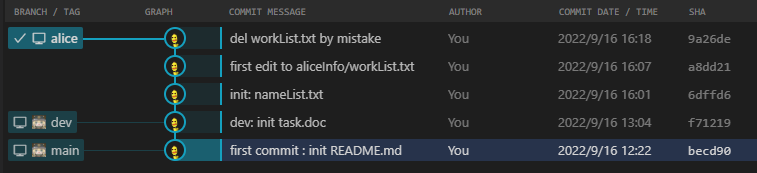
为了撤销这次删除操作,使用reset回滚到上一次commit对应的快照。根据下图可视化结果可以看到,我们希望回退到a8dd…对应的commit快照

1663317290536

1
2
3
4
5
6
7
8
9
10
11
12
13
14
15
16
17
18
19
20
21
22
23
# 如果没有可视化工具,可以使用 git log 查看提交历史
PS ~\aliceWorkspace> git log
commit 9a26de27db3a264c53bc50934a32817edfc8d3d3 (HEAD -> alice)
Author: WilsonGoGo <[email protected]>
Date: Fri Sep 16 16:18:10 2022 +0800
del workList.txt by mistake

commit a8dd21a0a01907bb801ccfc874d1fdf2c36fe57c
Author: WilsonGoGo <[email protected]>
Date: Fri Sep 16 16:07:49 2022 +0800
first edit to aliceInfo/workList.txt
...
# 回滚到a8dd...的commit快照
PS ~\aliceWorkspace> git reset a8dd
Unstaged changes after reset:
D aliceInfo/workList.txt
# 再次检查log记录
PS ~\aliceWorkspace> git log
commit a8dd21a0a01907bb801ccfc874d1fdf2c36fe57c (HEAD -> alice)
Author: WilsonGoGo <[email protected]>
Date: Fri Sep 16 16:07:49 2022 +0800
first edit to aliceInfo/workList.txt
...

回滚后的可视化结果

1663317515159

但是检查发现,文件并没有回到工作区,需要继续用git restore将工作区文件从快照切换回来

1
2
3
4
5
6
7
8
9
10
11
12
13
14
# 先通过git status查看
PS ~\aliceWorkspace> git status
On branch alice
Changes not staged for commit:
(use "git add/rm <file>..." to update what will be committed)
(use "git restore <file>..." to discard changes in working directory)
deleted: aliceInfo/workList.txt
no changes added to commit (use "git add" and/or "git commit -a")
# 使用restore命令恢复工作区文件
PS ~\aliceWorkspace> git restore .\aliceInfo\workList.txt
# 注:
# restore命令是从暂存区撤销改动
# 而我们之前虽然使用git reset回滚了commit快照,但是这并没有影响到工作区已经删除了workList.txt的现状
# 因此需要用restore从commit快照中恢复工作区缺少的文件

示例七:合并分支

1.简单合并分支

alice现在希望将之前的修改合并至dev分支上

1
2
3
4
5
6
7
8
9
10
11
12
# 切换至dev分支
PS ~\aliceWorkspace> git switch dev
Switched to branch 'dev'
# 将alice分支合并至主分支上
PS ~\aliceWorkspace> git merge alice
Updating f712190..a8dd21a
Fast-forward
aliceInfo/workList.txt | Bin 0 -> 60 bytes
nameList.txt | Bin 0 -> 16 bytes
2 files changed, 0 insertions(+), 0 deletions(-)
create mode 100644 aliceInfo/workList.txt
create mode 100644 nameList.txt

合并后的可视化图

1663327478070

因为创建alice分支后,dev分支自身并无变化,因此如上图所示,本次合并其实就是将dev分支的指针移动到alice分支的指针上即可

2.复杂合并分支

如果dev分支和alice分支分别做出了不同的改动,也可以直接进行merge合并

1
2
3
4
5
6
7
8
9
10
11
12
13
14
15
16
17
18
19
# dev分支进行改动
PS ~\aliceWorkspace> "bob" >> nameList.txt # 工作区的改动、暂存区的内容 与 当前分支无关
PS ~\aliceWorkspace> git switch dev # commit操作与当前分支相关,commit后会更新当前分支的指针
Switched to branch 'dev'
M nameList.txt # 这里是在切换分支时提示,此时还有没有add至暂存区的改动
Your branch is up to date with 'origin/dev'.
PS ~\aliceWorkspace> git add .
PS ~\aliceWorkspace> git commit -m "update nameList.txt : add bob"
[dev 03c3682] update nameList.txt : add bob
1 file changed, 0 insertions(+), 0 deletions(-)
# alice分支进行改动
PS ~\aliceWorkspace> git switch alice
Switched to branch 'alice'
PS ~\aliceWorkspace> "demo 1~6" >> .\aliceInfo\workList.txt
PS ~\aliceWorkspace> " complete" >> .\aliceInfo\workList.txt
PS ~\aliceWorkspace> git add .
PS ~\aliceWorkspace> git commit -m "update alice workList.txt : record demo 1~6"
[alice c3aa43b] update alice workList.txt : record demo 1~6
1 file changed, 0 insertions(+), 0 deletions(-)

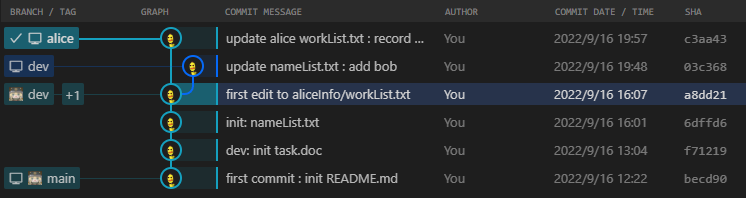
检查可视化视图,发现因为alice与dev上分别做出了改动,因此它们的指针开始有了分歧

1663329511022

但是由于在这两个分支上修改的内容并不冲突,因此仍然可以直接进行merge

1
2
3
4
5
6
7
# 现在希望将dev分支上的改动同步到alice分支上
PS ~\aliceWorkspace> git switch alice
Switched to branch 'alice'
PS ~\aliceWorkspace> git merge dev
Merge made by the 'ort' strategy.
nameList.txt | Bin 16 -> 26 bytes
1 file changed, 0 insertions(+), 0 deletions(-)

由于同步了dev分支,因此现在可以在alice分支上继续开发,并提交commit

1
2
3
4
5
6
PS ~\aliceWorkspace> "demo 7" >> .\aliceInfo\workList.txt
PS ~\aliceWorkspace> " working..." >> .\aliceInfo\workList.txt
PS ~\aliceWorkspace> git add .
PS ~\aliceWorkspace> git commit -m "update alice workList : demo 7 added"
[alice 3ebcf1e] update alice workList : demo 7 added
1 file changed, 0 insertions(+), 0 deletions(-)

现在我们完成了本轮alice分支的开发,将其保存至dev分支上去

1
2
3
4
5
6
7
8
9
PS ~\aliceWorkspace> git switch dev
Switched to branch 'dev'
Your branch is ahead of 'origin/dev' by 1 commit.
(use "git push" to publish your local commits)
PS ~\aliceWorkspace> git merge alice
Updating 03c3682..3ebcf1e
Fast-forward
aliceInfo/workList.txt | Bin 60 -> 144 bytes
1 file changed, 0 insertions(+), 0 deletions(-)

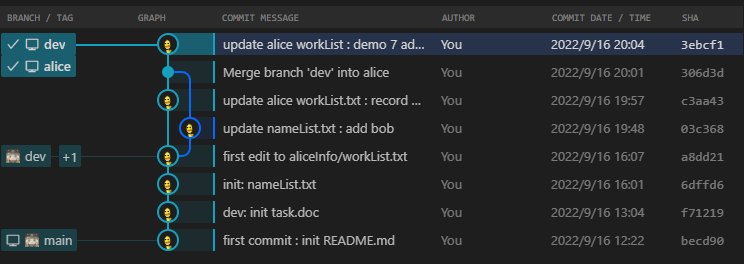
检查可视化结果,可以看到两分支最终再次交汇

1663330031701

3.合并冲突分支

先在dev分支和alice分支上都做出更改,但是这次对task.doc更改的内容是冲突的

1
2
3
4
5
6
7
8
9
10
11
12
13
14
15
# dev上更改
PS ~\aliceWorkspace> "working on dev is fine" >> .\task.doc
PS ~\aliceWorkspace> git add .
PS ~\aliceWorkspace> git commit -m "working on dev is fine"
[dev f8a5a91] working on dev is fine
1 file changed, 0 insertions(+), 0 deletions(-)
# alice上更改
PS ~\aliceWorkspace> git switch alice
Switched to branch 'alice'
PS ~\aliceWorkspace> "do not directly work on dev" >> .\task.doc
PS ~\aliceWorkspace> " complete" >> .\aliceInfo\workList.txt
PS ~\aliceWorkspace> git add .
PS ~\aliceWorkspace> git commit -m "don't directly work on dev"
[alice 83c0743] don't directly working on dev
2 files changed, 0 insertions(+), 0 deletions(-)

1663330487688

尝试合并会报错

1
2
3
4
5
PS ~\aliceWorkspace> git merge dev
warning: Cannot merge binary files: task.doc (HEAD vs. dev)
Auto-merging task.doc
CONFLICT (content): Merge conflict in task.doc
Automatic merge failed; fix conflicts and then commit the result.
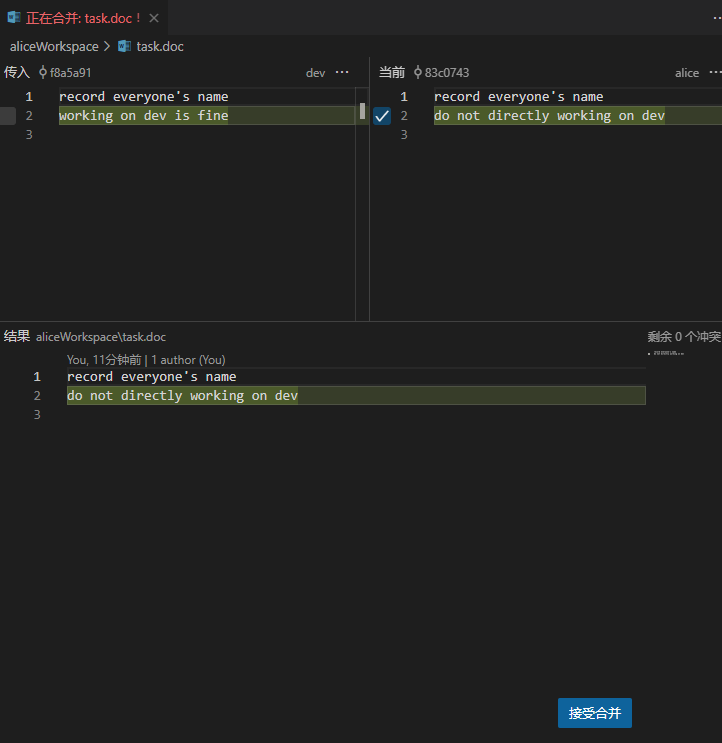
根据提示发现task.doc文件产生了冲突,这里可以通过切换分支观察该文件内的差异,手动修复冲突。这里使用了VsCode插件中的合并编辑器功能

1663331167872

修复成功后,通过以下指令决定下一步

1
2
3
4
5
6
7
# 确认解决冲突,提交新commit作为合并后的快照
PS ~\aliceWorkspace> git commit -m "merge : fix conflict in task.doc"
[alice 6259c91] merge : fix conflict in task.doc
# 中止合并
git merge --abort
# 撤销合并
git reset --merge

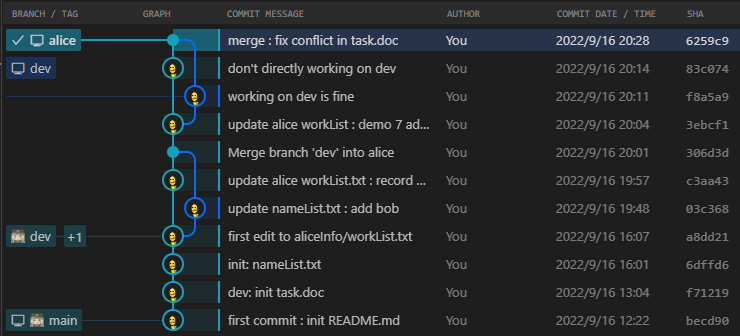
这里选择提交新commit来完成合并,可视化结果如下

1663331533951

最后记得将所有改动推送至远程仓库

1
2
3
4
5
6
7
8
9
10
11
PS ~\aliceWorkspace> git push origin --all
Enumerating objects: 27, done.
Counting objects: 100% (27/27), done.
Delta compression using up to 8 threads
Compressing objects: 100% (18/18), done.
Writing objects: 100% (22/22), 1.95 KiB | 665.00 KiB/s, done.
Total 22 (delta 11), reused 0 (delta 0), pack-reused 0
remote: Resolving deltas: 100% (11/11), done.
To github.com:WilsonGoGo/gitLearning.git
a8dd21a..6259c91 alice -> alice
a8dd21a..f8a5a91 dev -> dev