参考: Git 原理入门 - 阮一峰的网络日志 (ruanyifeng.com)
示例八:同步远程仓库 现在回到bob视角,由于之前alice对项目做过许多更改,现在需要更新本地仓库内容
1 2 3 4 5 6 7 8 9 10 11 12 13 14 15 16 17 18 19 20 21 22 23 24 25 26 27 28 29 30 31 PS ~\bobWorkspace\gitLearning> git fetch originremote: Enumerating objects: 27 , done. remote: Counting objects: 100 % (27 /27 ), done. remote: Compressing objects: 100 % (7 /7 ), done. remote: Total 22 (delta 11 ), reused 22 (delta 11 ), pack-reused 0 Unpacking objects: 100 % (22 /22 ), 1.93 KiB | 2.00 KiB/s, done. From github.com:WilsonGoGo/gitLearning f712190..f8a5a91 dev -> origin/dev a8dd21a..6259 c91 alice -> origin/alice PS ~\bobWorkspace\gitLearning> git pull origin devFrom github.com:WilsonGoGo/gitLearning * branch dev -> FETCH_HEAD Updating f712190..f8a5a91 Fast-forward aliceInfo/workList.txt | Bin 0 -> 144 bytes nameList.txt | Bin 0 -> 26 bytes task.doc | Bin 50 -> 98 bytes 3 files changed, 0 insertions(+), 0 deletions(-) create mode 100644 aliceInfo/workList.txt create mode 100644 nameList.txt
现在已经保证了本地dev分支与远程仓库的dev分支相同,bob开始第一次开发,并提交commit
1 2 3 4 5 6 7 8 9 PS ~\bobWorkspace\gitLearning> mkdir bobInfoPS ~\bobWorkspace\gitLearning> new-item bobInfo/workList.txtPS ~\bobWorkspace\gitLearning> git add .PS ~\bobWorkspace\gitLearning> git commit -m "init bobInfo" [dev 93 ae1a5 ] init bobInfo 1 file changed, 0 insertions(+), 0 deletions(-) create mode 100644 bobInfo/workList.txt
但是bob此时错误的将这次commit提交至了dev分支。现在bob希望撤销本次在dev分支上的commit,转而基于dev分支创建bob分支从而提交本次开发的commit
1 2 3 4 5 6 7 PS ~\bobWorkspace\gitLearning> git revert 93 ae1a[dev 6 a4218a ] Revert "init bobInfo" 1 file changed, 0 insertions(+), 0 deletions(-) delete mode 100644 bobInfo/workList.txt
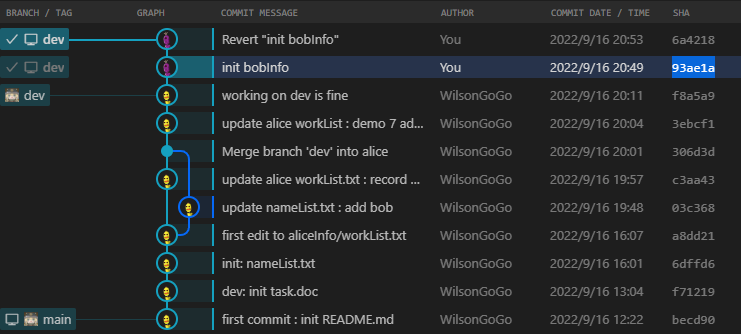
可视化结果如下,可以看出与reset不同,dev分支上多了一个revert操作对应的commit
示例九:冲突推送 1.push撤销 alice在nameList.txt内添加了carol的名字,并提交了commit,push至了远程仓库,alice需要撤销上一次push操作
1
2
3
4
5
6
7
8
9
10
11
12
13
14
15
16
17
18
PS ~\aliceWorkspace> "carol" >> .\nameList.txtEverything up-to-date PS ~\aliceWorkspace> git add .PS ~\aliceWorkspace> git switch devSwitched to branch 'dev' M nameList.txt Your branch is up to date with 'origin/dev' . PS ~\aliceWorkspace> git commit -m "nameList : add carol" [dev 782 de60 ] nameList : add carol 1 file changed, 0 insertions(+), 0 deletions(-) Enumerating objects: 5 , done. Counting objects: 100 % (5 /5 ), done. Compressing objects: 100 % (2 /2 ), done. Writing objects: 100 % (3 /3 ), 307 bytes | 307.00 KiB/s, done. Total 3 (delta 1 ), reused 0 (delta 0 ), pack-reused 0 remote: Resolving deltas: 100 % (1 /1 ), completed with 1 local object. To github.com:WilsonGoGo/gitLearning.git f8a5a91..782 de60 dev -> dev
方法一:用revert的方法,push一个撤销操作的commit至远程仓库
1 2 3 4 5 6 7 8 9 10 11 12 13 14 15 16 17 18 19 20 21 22 23 PS ~\aliceWorkspace> git reset HEAD^PS ~\aliceWorkspace> git merge origin/devUpdating f8a5a91..782 de60 Fast-forward nameList.txt | Bin 26 -> 40 bytes 1 file changed, 0 insertions(+), 0 deletions(-) PS ~\aliceWorkspace> git revert 782 de6[dev bf6cf22 ] Revert "nameList : add carol" 1 file changed, 0 insertions(+), 0 deletions(-) PS ~\aliceWorkspace> git push origin --all Enumerating objects: 5 , done. Counting objects: 100 % (5 /5 ), done. Delta compression using up to 8 threads Compressing objects: 100 % (2 /2 ), done. Writing objects: 100 % (3 /3 ), 323 bytes | 323.00 KiB/s, done. Total 3 (delta 1 ), reused 0 (delta 0 ), pack-reused 0 remote: Resolving deltas: 100 % (1 /1 ), completed with 1 local object. To github.com:WilsonGoGo/gitLearning.git 782 de60..bf6cf22 dev -> dev
方法二:如果本地已经使用了reset撤销了这次commit,考虑使用–force来push,实现覆盖远程仓库
1 PS ~\aliceWorkspace> git push --force origin --all
2.push冲突 现在模拟以下alice和bob同步开发导致的冲突,首先双方都需要先fetch仓库保证自己dev分支已经和远程仓库同步,然后双方各自在本地基于dev分支创建自己名称的分支,用于独立开发各自的内容
1 2 3 4 5 6 7 8 9 10 11 12 13 14 15 16 17 18 19 20 PS ~\aliceWorkspace> git fetch remote: Enumerating objects: 7 , done. remote: Compressing objects: 100 % (3 /3 ), done. remote: Total 6 (delta 1 ), reused 6 (delta 1 ), pack-reused 0 From github.com:WilsonGoGo/gitLearning PS ~\aliceWorkspace> git merge origin/devUpdating bf6cf22..f7c3213 Fast-forward PS ~\aliceWorkspace> git switch aliceSwitched to branch 'alice' PS ~\aliceWorkspace> git merge dev Merge made by the 'ort' strategy. PS ~\bobWorkspace\gitLearning> git fetchPS ~\bobWorkspace\gitLearning> git merge origin/devAlready up to date. PS ~\bobWorkspace\gitLearning> git branch bob PS ~\bobWorkspace\gitLearning> git switch bobSwitched to branch 'bob'
现在假设bob先一步开发完成,并将自己的内容合并至了dev分支
1 2 3 4 5 6 7 8 9 10 11 12 13 14 15 16 17 18 19 20 21 22 23 24 25 26 27 28 29 30 31 32 33 34 35 36 PS ~\bobWorkspace\gitLearning> mkdir bobInfoPS ~\bobWorkspace\gitLearning> new-item .\bobInfo\workList.txtPS ~\bobWorkspace\gitLearning> "demo 9" >> .\bobInfo\workList.txtPS ~\bobWorkspace\gitLearning> " complete" >> .\bobInfo\workList.txtPS ~\bobWorkspace\gitLearning> "bob finished" >> .\task.docPS ~\bobWorkspace\gitLearning> git add .PS ~\bobWorkspace\gitLearning> git commit -m "update : bob workList and task.doc" [bob 1220 d06 ] update : bob workList and task.doc 2 files changed, 0 insertions(+), 0 deletions(-) create mode 100644 bobInfo/workList.txt PS ~\bobWorkspace\gitLearning> git switch devSwitched to branch 'dev' Your branch is up to date with 'origin/dev' . PS ~\bobWorkspace\gitLearning> git merge bobUpdating f7c3213..1220 d06 Fast-forward bobInfo/workList.txt | Bin 0 -> 40 bytes task.doc | Bin 98 -> 126 bytes 2 files changed, 0 insertions(+), 0 deletions(-) create mode 100644 bobInfo/workList.txt PS ~\bobWorkspace\gitLearning> git push origin --all Enumerating objects: 7 , done. Counting objects: 100 % (7 /7 ), done. Delta compression using up to 8 threads Compressing objects: 100 % (3 /3 ), done. Writing objects: 100 % (5 /5 ), 458 bytes | 458.00 KiB/s, done. Total 5 (delta 2 ), reused 0 (delta 0 ), pack-reused 0 remote: Resolving deltas: 100 % (2 /2 ), completed with 2 local objects. To github.com:WilsonGoGo/gitLearning.git f7c3213..1220 d06 dev -> dev * [new branch ] bob -> bob
这时候alice也同步进行开发
1 2 3 4 5 6 7 8 9 10 11 12 13 14 15 16 17 18 19 PS ~\aliceWorkspace> " complete" >> .\aliceInfo\workList.txtPS ~\aliceWorkspace> "alice complete" >> .\task.docPS ~\aliceWorkspace> git add .PS ~\aliceWorkspace> git commit -m "update : alice workList and task.doc" [alice 18524 b6 ] update : alice workList and task.doc 2 files changed, 0 insertions(+), 0 deletions(-) PS ~\aliceWorkspace> git switch dev Switched to branch 'dev' Your branch is up to date with 'origin/dev' . PS ~\aliceWorkspace> git merge aliceUpdating f7c3213..18524 b6 Fast-forward aliceInfo/workList.txt | Bin 144 -> 230 bytes task.doc | Bin 98 -> 146 bytes 2 files changed, 0 insertions(+), 0 deletions(-)
但是由于alice和bob在开发时都修改了task.doc文件,因此在推送时会产生冲突,报错如下所示
1
2
3
4
5
6
7
8
9
10
11
12
13
14
15
16
17
PS ~\aliceWorkspace> git push origin --all Enumerating objects: 26 , done. Counting objects: 100 % (25 /25 ), done. Delta compression using up to 8 threads Compressing objects: 100 % (12 /12 ), done. Writing objects: 100 % (16 /16 ), 1.78 KiB | 909.00 KiB/s, done. Total 16 (delta 5 ), reused 0 (delta 0 ), pack-reused 0 remote: Resolving deltas: 100 % (5 /5 ), completed with 3 local objects. To github.com:WilsonGoGo/gitLearning.git ad21717..18524 b6 alice -> alice ! [rejected ] dev -> dev (fetch first) error: failed to push some refs to 'github.com:WilsonGoGo/gitLearning.git' hint: Updates were rejected because the remote contains work that you do hint: not have locally. This is usually caused by another repository pushing hint: to the same ref. You may want to first integrate the remote changes hint: (e.g., 'git pull ...' ) before pushing again. hint: See the 'Note about fast-forwards' in 'git push --help' for details.
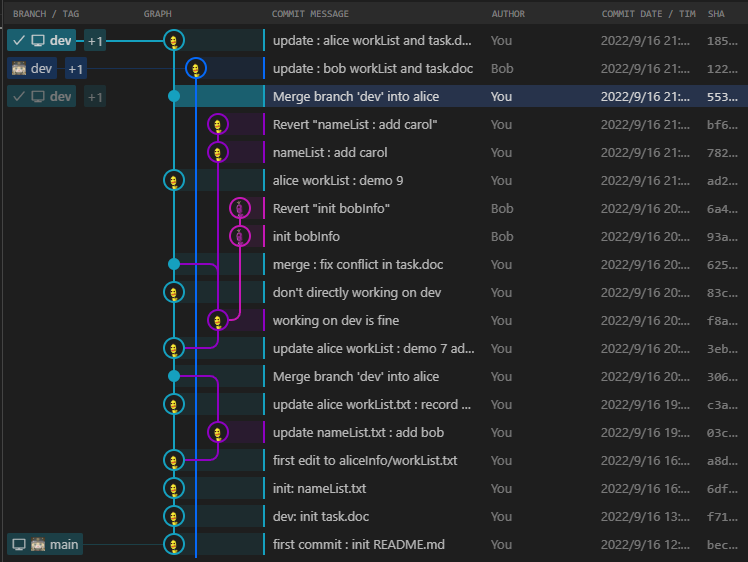
为了解决冲突,先将远程仓库同步至本地,检查可视化视图(蓝色是远程仓库分支)
1 2 3 4 5 6 7 8 9 10 11 12 13 14 15 16 17 PS ~\aliceWorkspace> git fetchremote: Enumerating objects: 7 , done. remote: Counting objects: 100 % (7 /7 ), done. remote: Compressing objects: 100 % (1 /1 ), done. remote: Total 5 (delta 2 ), reused 5 (delta 2 ), pack-reused 0 Unpacking objects: 100 % (5 /5 ), 438 bytes | 4.00 KiB/s, done. From github.com:WilsonGoGo/gitLearning f7c3213..1220 d06 dev -> origin/dev * [new branch ] bob -> origin/bob PS ~\aliceWorkspace> git merge origin/devwarning: Cannot merge binary files: task.doc (HEAD vs. origin/dev) Auto-merging task.doc CONFLICT (content): Merge conflict in task.doc Automatic merge failed; fix conflicts and then commit the result.
借助VsCode的冲突编辑文本,修改冲突文件
1 2 3 4 5 6 7 8 9 10 11 12 13 14 PS ~\aliceWorkspace> git commit -m "merge : fix conflict about task.doc between alice and bob" [dev b650c32 ] merge : fix conflict about task.doc between alice and bob PS ~\aliceWorkspace> git push origin --all Enumerating objects: 7 , done. Counting objects: 100 % (7 /7 ), done. Delta compression using up to 8 threads Compressing objects: 100 % (3 /3 ), done. Writing objects: 100 % (3 /3 ), 399 bytes | 399.00 KiB/s, done. Total 3 (delta 2 ), reused 0 (delta 0 ), pack-reused 0 remote: Resolving deltas: 100 % (2 /2 ), completed with 2 local objects. To github.com:WilsonGoGo/gitLearning.git 1220 d06..b650c32 dev -> dev
alice推送完成后,bob也需要再次同步
1
2
3
4
5
6
7
8
9
10
11
12
13
14
PS ~\bobWorkspace\gitLearning> git pull origin devremote: Enumerating objects: 21 , done. remote: Counting objects: 100 % (19 /19 ), done. remote: Compressing objects: 100 % (3 /3 ), done. remote: Total 9 (delta 5 ), reused 9 (delta 5 ), pack-reused 0 Unpacking objects: 100 % (9 /9 ), 994 bytes | 4.00 KiB/s, done. From github.com:WilsonGoGo/gitLearning * branch dev -> FETCH_HEAD 1220 d06..b650c32 dev -> origin/dev Updating 1220 d06..b650c32 Fast-forward aliceInfo/workList.txt | Bin 144 -> 230 bytes task.doc | Bin 126 -> 174 bytes 2 files changed, 0 insertions(+), 0 deletions(-)
检查最终可视化结果
示例十:rebase的使用 如果Alice在开发中途发现自己基于的dev版本过时,可以更新自己本地的dev分支后,用rebase命令将自己的alice分支上的修改应用于新的dev分支
1 2 3 4 5 6 7 8 9 10 11 12 13 14 15 16 17 PS ~\bobWorkspace\gitLearning> "need demo for rebase" >> .\task.doc PS ~\bobWorkspace\gitLearning> git add . PS ~\bobWorkspace\gitLearning> git commit -m "add new need to task.doc" [dev dd187f9 ] add new need to task.doc 1 file changed, 0 insertions(+), 0 deletions(-) PS ~\bobWorkspace\gitLearning> git push origin --all Enumerating objects: 5 , done. Counting objects: 100 % (5 /5 ), done. Delta compression using up to 8 threads Compressing objects: 100 % (3 /3 ), done. Writing objects: 100 % (3 /3 ), 326 bytes | 326.00 KiB/s, done. Total 3 (delta 2 ), reused 0 (delta 0 ), pack-reused 0 remote: Resolving deltas: 100 % (2 /2 ), completed with 2 local objects. To github.com:WilsonGoGo/gitLearning.git b650c32..dd187f9 dev -> dev
而alice不知道远程仓库的dev分支已更新,alice仍基于之前的dev分支开发当前的alice分支,并完成了两次commit提交
1 2 3 4 5 6 7 8 9 10 11 12 PS ~\aliceWorkspace> " complete" >> .\aliceInfo\workList.txtPS ~\aliceWorkspace> git add .PS ~\aliceWorkspace> git commit -m "update : alice workList demo 10" [alice b32b1eb ] update : alice workList demo 10 1 file changed, 0 insertions(+), 0 deletions(-) PS ~\aliceWorkspace> "working on rebase demo" >> task.docPS ~\aliceWorkspace> git add .PS ~\aliceWorkspace> git commit -m "update rebase need to task.doc" [alice f85fda0 ] update rebase need to task.doc 1 file changed, 0 insertions(+), 0 deletions(-)
alice尝试更新自己的dev分支
1
2
3
4
5
6
7
8
9
10
11
12
13
14
15
16
17
18
PS ~\aliceWorkspace> git fetch remote: Enumerating objects: 5, done. remote: Compressing objects: 100% (1/1), done. remote: Total 3 (delta 2), reused 3 (delta 2), pack-reused 0 Unpacking objects: 100% (3/3), 306 bytes | 4.00 KiB/s, done. From github.com:WilsonGoGo/gitLearning b650c32..dd187f9 dev -> origin/dev PS ~\aliceWorkspace> git switch dev Switched to branch 'dev' Your branch is behind 'origin/dev' by 1 commit, and can be fast-forwarded. (use "git pull" to update your local branch) PS ~\aliceWorkspace> git pull origin dev From github.com:WilsonGoGo/gitLearning * branch dev -> FETCH_HEAD Updating b650c32..dd187f9 Fast-forward task.doc | Bin 174 -> 218 bytes 1 file changed, 0 insertions(+), 0 deletions(-)
可视化结果如下
alice需要将自己之前在alice分支上的改动应用于新的dev分支上(即上图中蓝色分支的新节点)
1
2
3
4
5
6
7
8
9
10
11
12
# 执行rebase指令 PS ~\aliceWorkspace> git rebase dev alice warning: Cannot merge binary files: task.doc (HEAD vs. f85fda0 (update rebase need to task.doc)) Auto-merging task.doc CONFLICT (content): Merge conflict in task.doc error: could not apply f85fda0... update rebase need to task.doc hint: Resolve all conflicts manually, mark them as resolved with hint: "git add/rm <conflicted_files>", then run "git rebase --continue". hint: You can instead skip this commit: run "git rebase --skip". hint: To abort and get back to the state before "git rebase", run "git rebase --abort". Could not apply f85fda0... update rebase need to task.doc #
因为task.doc的修改有冲突,需要手动解决。仍然借助VsCode的冲突编辑器查看冲突,并重新修改内容
1 2 3 4 5 6 7 PS ~\aliceWorkspace> git add .PS ~\aliceWorkspace> git commit -m "fix conflict in task.doc during rebase" 1 file changed, 0 insertions(+), 0 deletions(-) PS ~\aliceWorkspace> git rebase --continue Successfully rebased and updated refs/heads/alice.
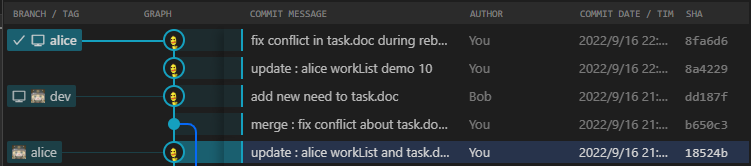
最终可视化结果如图所示,可以看到alice分支被续接在新的dev分支节点之后